
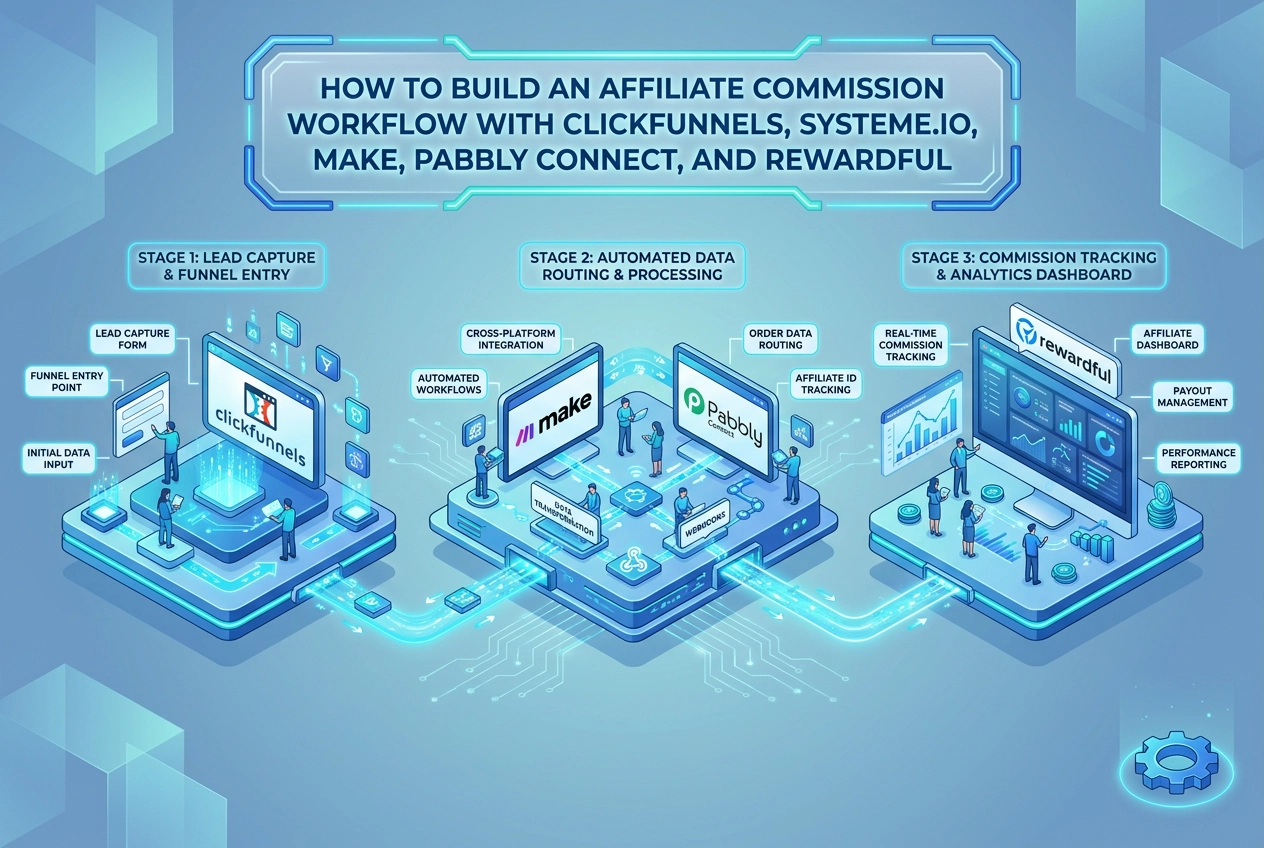
Skip the reading. Deploy this exact architecture and consolidate your B2B tech stack today.
Running affiliate commissions across a multi-tool stack sounds straightforward until you realize that ClickFunnels, Systeme.io, and Rewardful do not natively talk to each other. Bridging that gap requires deliberate middleware architecture, and getting it wrong means commissions go untracked, affiliates go unpaid, and your attribution data becomes unreliable.
This guide walks you through building a production-ready affiliate commission workflow that connects ClickFunnels, Systeme.io, Make, Pabbly Connect, and Rewardful into a single event-driven system. You will learn exactly what role each tool plays, how to configure webhooks and Stripe triggers, and how to route sale events so Rewardful calculates commissions accurately every time a purchase fires.
Beyond the basic setup, this blueprint covers advanced error handling, middleware selection trade-offs between Make and Pabbly Connect, Systeme.io contact tagging limitations, and the full architectural logic connecting all five tools. You will also find a cost breakdown to help you evaluate whether this stack fits your current business stage. If you are comfortable with webhooks, API concepts, and automation platforms, this workflow blueprint is built for your skill level.
What This Workflow Actually Does (And Why It Requires Five Tools)
When a buyer completes a purchase on a ClickFunnels order form, four dependent actions must fire in sequence: the payment processes through Stripe, a webhook delivers the transaction data to middleware, Systeme.io updates the contact record and grants course access, and Rewardful receives the Stripe charge event to calculate and credit the referring affiliate. No single platform in this stack executes all four steps.
Each tool owns exactly one responsibility. ClickFunnels manages funnel pages and checkout. Systeme.io controls contact management and course access. Make or Pabbly Connect serves as event-routing middleware between them. Rewardful specializes exclusively in affiliate commission tracking. This division is intentional, not a gap to engineer around.
The Stripe dependency is the architectural linchpin. Rewardful does not listen to ClickFunnels events directly; it listens to Stripe charge events and matches them against affiliate referral cookies set when a visitor first clicked a referral link. If payment does not route through the Stripe account connected to Rewardful, commission attribution never fires, regardless of what the middleware does.
This best-of-breed approach reflects a broader shift visible across practitioner communities through 2025 and 2026: teams are deliberately assembling modular stacks rather than forcing a single platform to handle functions it handles poorly. If you have worked through a similar middleware decision before, the architecture patterns covered in this HighLevel and Metricool workflow blueprint using Make and Pabbly Connect apply directly to the routing logic examined here.
This guide covers webhook configuration, the Make versus Pabbly Connect middleware decision, the multi-tag workaround for Systeme.io, Rewardful payload mapping, and error handling architecture for production deployments.
Tool Roles and Prerequisites Before You Build
Before touching any configuration, confirm all five accounts are active and understand the role each plays in the stack.
- ClickFunnels: Funnel and checkout layer. Hosts order form pages and fires purchase webhooks downstream.
- Systeme.io: Contact and course access management. Receives buyer data from middleware and applies tags or grants enrollment.
- Make: Scenario-based middleware for advanced conditional logic, parallel routing, and error handling.
- Pabbly Connect: Task-based middleware with 500+ native integrations, including direct connectors for both ClickFunnels and Systeme.io.
- Rewardful: Affiliate commission tracking. Listens to Stripe charge events and credits the attributed affiliate.
Stripe is the non-negotiable prerequisite. The ClickFunnels order form must process payments through Stripe, and that exact Stripe account must be authorized inside Rewardful. A mismatch between these two Stripe connections is the single most common reason commissions never fire. Verify account IDs match before proceeding.
Rewardful attribution model: Rewardful uses cookie-based attribution, check your campaign settings to confirm the attribution window and model before distributing affiliate links. Define your cookie lifetime inside the campaign settings before going live, since a short window can drop attribution on longer sales cycles.
Systeme.io minimum requirements: At least one active funnel or course product, a defined tag taxonomy that maps to each purchasable product, and webhook output enabled at the workflow or funnel level.
ClickFunnels funnel requirements: A published order form step connected to Stripe, with webhook output configured to fire on successful purchase events. ClickFunnels launched in 2014 and webhook output is available across current plan tiers, confirm your plan tier in account settings before proceeding. Explore how these tools fit within broader CRM and funnel builder categories if you are still evaluating the stack composition.
Choosing Your Middleware: Make vs. Pabbly Connect for This Stack
With your prerequisites confirmed, the next decision is which middleware routes your purchase events. The two tools operate on fundamentally different models.
Make uses a scenario-based visual canvas where conditional logic branches, multi-step filters, and parallel execution paths are native features. Pabbly Connect uses a linear task-based model with 500+ native app connectors, optimized for sequential automation without branching complexity.
Where Make Has the Advantage
Make is the stronger choice for multi-product affiliate programs. Its Router module splits a single purchase event into conditional paths based on product name or transaction amount, enabling different Systeme.io tag assignments and different Rewardful commission tiers for a core offer versus an upsell within one scenario. Built-in error handlers with retry scheduling mean failed API calls are captured and reprocessed automatically rather than silently dropped. For high-volume or high-stakes commission workflows, that reliability gap is significant. See the full Make platform profile for capability details.
Where Pabbly Connect Has the Advantage
Pabbly Connect’s flat-rate pricing eliminates per-task cost scaling, making it more predictable as transaction volume grows. Its native Systeme.io connector removes manual webhook configuration for straightforward single-product setups and deploys faster than a custom Make HTTP module path.
Known limitation: Pabbly Connect’s “Grant Course Access” action may support only one tag per operation depending on connector version, verify in your workflow before go-live. Upsell tracking requiring multiple simultaneous tags must use sequential action steps or delegate additional tagging to Systeme.io’s internal automation rules.
Recommendation Framework
- Use Pabbly Connect for single-offer workflows, simple contact sync, and teams prioritizing cost predictability.
- Use Make for multi-product funnels, conditional commission tiers, or any path requiring robust error retry logic.
- Use both in parallel: assign Make to conditional and error-handling paths and Pabbly Connect to high-frequency routine tasks, keeping Make’s operation count, and therefore its plan tier, low.
Step 1: Configure Rewardful and Connect Your Stripe Account
With middleware selected, the next task is establishing Rewardful’s attribution foundation before a single webhook fires.
Create Your Campaign
Inside Rewardful, create a new campaign and configure three settings immediately:
- Commission type: percentage of sale or flat fee per conversion
- Cookie duration: how many days a referral click remains attributable
- Payout threshold: minimum earned balance before a commission is payable
These values govern how every incoming Stripe charge event is scored and credited. Set them before connecting Stripe or distributing links.
Connect Stripe via OAuth
Inside Rewardful’s settings, locate the Stripe integration panel and authorize the OAuth connection. Confirm the Stripe account authorized here is the exact account processing payments inside your ClickFunnels order form, a mismatch is the single most common reason commissions fail to fire.
Install the Tracking Script on All Funnel Pages
Rewardful generates a JavaScript snippet that must be placed in the <head> of every ClickFunnels page where affiliate traffic lands, including the optin page, sales page, and order form. Restricting installation to the confirmation page breaks attribution because the referral cookie is never set at first touchpoint.
Distribute Affiliate Links
Once the campaign is active, affiliates receive unique referral URLs that append a tracking parameter to the funnel page URL. Rewardful reads that parameter on arrival, writes the cookie, and later matches it to the corresponding Stripe charge.
Validate Attribution Before Proceeding
Using an incognito browser with no ad blocker, click a test affiliate link, complete a Stripe test charge, then check the Rewardful dashboard for a credited referral. Also verify inside Stripe that the customer record contains a referral metadata field with an alphanumeric value. A missing metadata field indicates the server-side integration is incomplete. Resolve all attribution gaps before configuring any middleware webhooks.
Step 2: Set Up the ClickFunnels Purchase Webhook
With Rewardful’s attribution chain confirmed, the next step is configuring ClickFunnels to broadcast purchase events to your middleware.
Locate the Webhook Configuration
In ClickFunnels, locate the webhook configuration in your funnel’s order form step settings, the exact path varies by ClickFunnels version, so consult ClickFunnels’ documentation for your plan. This architecture means each order form can send a distinct payload to a different endpoint, which matters when running multiple product lines through separate middleware paths.
Add the Middleware Endpoint URL
Before creating the webhook in ClickFunnels, retrieve the listener URL from your middleware. In Pabbly Connect, open a new workflow and copy the webhook trigger URL. In Make, create a new scenario with a Custom Webhook module and copy its generated URL. Paste the URL into the ClickFunnels webhook endpoint field.
Select the Correct Event Trigger
Set the event type to purchase or order created to restrict the webhook to confirmed transactions only. Page visits and abandoned cart events will not fire, preventing phantom records from polluting your Systeme.io contact list or triggering false Rewardful commission pings.
Understand the Payload Fields
The ClickFunnels purchase payload typically includes contact details, product information, and transaction identifiers, capture and map the full payload during your test purchase to confirm exact field names before building downstream logic. The Stripe charge ID is the most critical field; Rewardful uses it to match the stored affiliate cookie to the completed charge and credit the commission. Map this field explicitly in your middleware logic. For deeper guidance on routing these fields programmatically, see Mastering Custom Webhooks and API Routing.
Run a Test Purchase
Trigger a test purchase using ClickFunnels’ test mode with a Stripe test card. Confirm the payload appears in the Pabbly Connect workflow history or the Make scenario execution log. A successful test shows all payload fields populated correctly. Do not advance to middleware mapping until payload arrival is verified.
Step 3: Build the Pabbly Connect Workflow to Route the Sale Event
With the ClickFunnels webhook confirmed and delivering a test payload, open Pabbly Connect and create a new workflow. Name it something unambiguous, such as “ClickFunnels Purchase > Systeme.io + Rewardful.”
1. Set the trigger module to Webhook/API. Pabbly Connect generates a unique listener URL. Copy it and paste it into the ClickFunnels webhook field you configured in Step 2. Send a test purchase event from ClickFunnels so Pabbly Connect captures the live payload structure.
2. Map the payload fields to named variables. From the captured response, explicitly map contact_email, product_name, and stripe_charge_id as labeled variables. Every downstream action step references these names, so precise labeling prevents mapping errors later.
3. Add a Systeme.io “Create or Update Contact” action. Use the mapped contact_email field as the lookup key. This upsert step guarantees the buyer’s record exists in Systeme.io before any tag or course access action runs. Attempting to assign a tag to a non-existent contact will cause the action to fail silently.
4. Handle multiple tags with sequential steps. As noted in the middleware comparison, sequential action steps handle multi-tag requirements, Pabbly Connect’s “Grant Course Access” action may support only one tag per action step depending on connector version, so verify in your workflow before go-live and add a second Systeme.io action step for each additional tag required.
5. Add an HTTP action step for Rewardful. If a native Rewardful connector is unavailable, add an HTTP POST action pointed to Rewardful’s conversions API, consult Rewardful’s API documentation for the required fields and authentication headers before configuring this step. This manual ping ensures commission attribution fires even when the Stripe charge originates from ClickFunnels.
Step 4: Build the Make Scenario for Advanced Logic and Error Handling
Where Pabbly Connect handles linear task routing, Make adds conditional branching and fault-tolerant error recovery the linear model cannot replicate natively.
1. Create the Custom Webhook trigger. In Make, add a new scenario and select the Webhooks module set to “Custom Webhook.” Make generates a unique endpoint URL; paste this into the ClickFunnels funnel step webhook field. If running Make and Pabbly Connect in parallel, use a separate webhook entry for each so payloads do not collide.
2. Add a Router module for conditional logic. Connect a Router module directly after the webhook. Filter one route on product_name or transaction_amount to separate core offer purchases from upsell purchases, letting you assign different Systeme.io tags and different Rewardful commission tier logic on each branch without duplicating scenarios.
3. Configure the Systeme.io HTTP module. If no native Systeme.io module is available in Make, use an HTTP module on each Router branch, check Make’s current app directory for the latest connector availability. Set the method to POST, point the URL to Systeme.io’s REST contact-tagging endpoint, pass your API key from Systeme.io Settings > API Keys in the Authorization header, and map the buyer email from the webhook payload to the request body.
4. Attach error handlers to critical modules. Right-click each HTTP module and select “Add error handler.” Configure it to retry on transient failures or write failed records to a Make data store for manual review. This is the primary reason to route high-value commission events through Make. If you are still evaluating whether Make’s operation-based pricing fits your stack, the marketing automation platform comparison guide maps tooling tiers to workflow complexity.
5. Confirm Instant trigger mode. In scenario settings, verify the trigger is set to “Instant” rather than a scheduled interval. Scheduled polling creates lag between the Stripe charge event and the Rewardful attribution ping; instant mode fires the moment ClickFunnels delivers the payload, keeping commission timestamps aligned with the actual transaction.
Step 5: Configure Systeme.io for Contact Tagging and Course Access
With the Make scenario handling conditional routing upstream, Systeme.io becomes the access control layer where purchase outcomes are enforced and post-purchase engagement begins.
1. Create product tags with exact-match naming. In Systeme.io, navigate to the CRM tab and create a tag for each purchasable product. Tag names must exactly match the product_name values in the ClickFunnels webhook payload. If the webhook sends "product_name": "Client-Course-1", the tag must be Client-Course-1. Any mismatch forces middleware remapping and introduces failure points.
2. Build the automation rule triggered by tag application. Inside Systeme.io’s automation rules, set the trigger to “Tag applied” and select the purchase tag. Chain these actions in sequence: grant course access to the corresponding product, subscribe the contact to the post-purchase email campaign, and optionally apply a second tag such as Upsell-Eligible.
3. Configure Systeme.io webhook output for confirmation. If Systeme.io supports outbound webhooks for tag or access events on your plan, point them to a Make data store module or Pabbly Connect listener to log successful provisioning events, verify webhook output availability in your Systeme.io account settings.
4. Understand the decoupling benefit. Because access control logic lives inside Systeme.io rules, middleware downtime does not lock out buyers. A support team member can manually apply the purchase tag in the Contacts CRM, triggering the full automation chain without any middleware involvement.
5. Test end-to-end. Trigger the middleware workflow with a test purchase. Confirm the contact appears in Systeme.io with the correct tag, verify course access is active under that contact’s record, and check that the post-purchase email sequence shows an enrollment entry. Resolve any sequencing gaps before activating live affiliate traffic.
How Rewardful Calculates Commissions When the Workflow Fires
With Systeme.io confirmed as the access control layer, the parallel commission path through Rewardful deserves equal scrutiny because it operates entirely independently of your middleware.
Attribution model: When a visitor clicks an affiliate referral link, Rewardful sets a tracking cookie for the affiliate referral. When a Stripe charge is created, Rewardful’s webhook listener matches the customer email or Stripe customer ID to that cookie and credits the affiliate. No middleware action triggers this; Stripe does.
When a direct API call is required: If ClickFunnels’ payment handling does not produce a standard Stripe customer record Rewardful can match, attribution will fail silently. The fix is an HTTP POST to Rewardful’s conversions API, consult Rewardful’s API documentation for the required payload fields and authentication method. Add this as an HTTP action step inside Make or Pabbly Connect after the Systeme.io upsert completes.
Dashboard confirmation: After a test purchase, navigate to Rewardful > Referrals. Confirm the conversion shows the correct affiliate, commission amount, and Stripe charge reference. A pending status is normal while the transaction is under review; check your Rewardful campaign settings for your specific payout timeline.
Recurring commissions: For subscription products, Rewardful monitors subsequent charges linked to the original customer record and credits the referring affiliate on each renewal. Confirm recurring commission settings are enabled inside your campaign before go-live, consult Rewardful’s documentation for whether the setting applies retroactively.
For a broader evaluation, the B2B Tech Stacker software review library provides structured breakdowns across the affiliate tracking and automation categories.
Error Handling and Reliability Architecture for Production Deployments
With commission attribution logic confirmed, the next layer to harden is operational reliability. Three failure points carry the most risk in production.
Failure Point 1: ClickFunnels Webhook Delivery
Check your ClickFunnels webhook settings for delivery logs, most funnel platforms record outbound webhook attempts; consult ClickFunnels documentation to confirm log access on your plan. For production resilience, register a second webhook endpoint at the same funnel step level, pointing to a backup Pabbly Connect workflow or a separate Make scenario. If the primary endpoint returns a non-200 response, the backup receives the same payload independently, preventing permanent event loss.
Failure Point 2: Systeme.io API Failures in Pabbly Connect
After the Systeme.io contact upsert action, add a filter step that checks the response code. On failure, branch to either Pabbly Connect’s built-in re-attempt feature or an email notification action that alerts a team member to apply the tag manually. Field validation errors (mismatched data types or missing required fields) are the most common cause; confirm your payload mapping against Systeme.io’s API field requirements before go-live.
Failure Point 3: Make Scenario Errors
Make’s execution history retains records of incomplete runs, consult Make’s documentation for data retention limits and manual reprocessing options on your plan. This persistent error storage makes Make more resilient than Pabbly Connect for high-stakes commission workflows where losing a record is unacceptable.
Failure Point 4: Rewardful Attribution Mismatches
Run a daily reconciliation by comparing Stripe charge IDs in the Rewardful dashboard against the ClickFunnels order log. Any Stripe charge absent from Rewardful referrals after 24 hours signals a cookie attribution gap or a Stripe customer ID mapping issue requiring manual investigation.
Full Workflow Architecture: How All Five Tools Connect
With error handling architecture in place, here is how all five tools fit together as a unified system.
Complete data flow, linear sequence:
- Affiliate shares referral link; Rewardful sets a tracking cookie on the visitor’s browser
- Visitor lands on the ClickFunnels funnel page
- Visitor completes a Stripe-powered purchase on the ClickFunnels order form
- ClickFunnels fires a purchase webhook to Pabbly Connect, Make, or both
- Middleware routes contact data to Systeme.io for tag application and course access provisioning
- Stripe independently fires the charge event to Rewardful
- Rewardful matches the stored cookie to the Stripe charge and credits the affiliate commission
Steps 5 and 6 run simultaneously and do not depend on each other, see the error handling section for how to protect each path independently.
Systeme.io as an active participant. Once a tag is applied, Systeme.io fires its own internal automation rules for post-purchase sequences, upsell tagging, and course enrollment. That internal processing reduces the volume of tasks routed through paid middleware tiers.
Scalability advantage. Because Rewardful attribution runs on Stripe’s native webhook infrastructure, commission tracking scales with Stripe’s reliability, not with Pabbly Connect task quotas or Make operation counts.
Stack Cost Considerations and When This Architecture Makes Sense
Understanding the architecture is only half the equation. Before committing to five paid subscriptions, evaluate whether the cost structure fits your revenue model.
Cost structure at a glance:
- ClickFunnels: highest monthly cost in the stack; justified by its funnel-building and Stripe checkout capabilities
- Systeme.io: competitive all-in-one pricing that offsets stack cost meaningfully compared to higher-cost funnel platforms
- Pabbly Connect: flat-rate pricing regardless of task volume, making it cost-predictable under high transaction loads
- Make: operation-based pricing that scales with workflow complexity; cost rises with conditional branches and execution frequency
- Rewardful: percentage-of-revenue or flat-fee depending on the plan selected
This stack is justified when: affiliate-driven sales are a meaningful share of total revenue and accurate commission attribution is operationally critical; course creators managing multiple funnels across distinct audience segments need centralized access control in Systeme.io; or B2B SaaS teams use ClickFunnels for lead acquisition while Systeme.io handles member access independently.
Skip this architecture when: fewer than 10 active affiliates are in the program, the funnel covers a single product without upsell paths, or no team member can maintain webhook configurations reliably. In those cases, operational overhead outweighs the automation benefit.
Route all routine contact sync through Pabbly Connect and reserve Make exclusively for conditional logic and error handling, keeping Make’s operation count low while retaining its routing and retry capabilities where they matter most.
Frequently Asked Questions
Does Rewardful work directly with ClickFunnels, or does it need middleware?
Rewardful listens to Stripe charge events, not ClickFunnels events. If ClickFunnels processes payments through the same Stripe account connected to Rewardful, and the Rewardful tracking script is installed on the funnel pages, commissions fire automatically. Middleware is required only to update Systeme.io contact records, not to trigger Rewardful.
Can I use both Make and Pabbly Connect in the same workflow?
Yes. A common architecture assigns Pabbly Connect to high-frequency Systeme.io contact sync operations, leveraging its flat-rate pricing and native connector, while Make handles conditional routing and error handling for complex multi-product scenarios. Use separate webhook entries for each middleware endpoint so payloads do not collide.
What happens if the Pabbly Connect workflow fails to tag a contact in Systeme.io?
Rewardful commission attribution is unaffected because it runs through Stripe independently. The practical impact is that the buyer may not immediately receive course access. Mitigations include Pabbly Connect’s built-in retry feature, a Make error handler writing failed records to a data store, or a fallback Systeme.io automation rule granting access from an alternate trigger.
How do I handle multi-tag assignments in Pabbly Connect for upsell tracking?
As noted in the middleware comparison, Pabbly Connect’s “Grant Course Access” action may support only one tag per operation depending on connector version, verify in your workflow before go-live. Add sequential Systeme.io action steps in the same workflow, one per tag. Alternatively, apply a single primary tag via Pabbly Connect and configure Systeme.io’s internal automation rules to apply additional tags when that primary tag is detected.
Does this workflow support recurring subscription commissions?
Yes, provided recurring commissions are enabled in your Rewardful campaign settings. Rewardful monitors subsequent Stripe charges tied to the original customer record and attributes each renewal to the referring affiliate at the configured recurring commission rate, consult Rewardful’s documentation for configuration details.
Is Systeme.io required, or can ClickFunnels handle everything?
Systeme.io manages contact records and course access. ClickFunnels handles funnel pages and payment processing. Decoupling the two reduces the risk of a single platform failure disrupting both the sales process and member experience.
Where should I install the Rewardful tracking script in ClickFunnels?
Add the JavaScript snippet to the header tracking code of every funnel page where affiliate traffic lands: the optin page, sales page, order form page, and order confirmation page. Installing it only on the confirmation page sets the referral cookie after purchase, breaking attribution entirely.
Conclusion: Putting the Workflow Into Production
With the FAQ covering the edge cases, three actions move this stack from configured to production-ready.
First, connect Rewardful to the Stripe account linked inside ClickFunnels and install the tracking script on every funnel page where affiliate traffic lands. Second, configure the ClickFunnels purchase webhook to fire at Pabbly Connect or Make on confirmed purchase events only. Third, run a Stripe test charge through the full chain and verify that Systeme.io tags the contact correctly and Rewardful registers the conversion before any live affiliate campaigns go active.
Each tool owns exactly one responsibility, the parallel paths run independently, and the error handling layer ensures failures are captured rather than silently dropped.