
Skip the reading. Deploy this exact architecture and consolidate your B2B tech stack today.
Building a B2B SaaS MVP: User Onboarding, Support, and Retention Workflows
Launching a Minimum Viable Product (MVP) in the B2B Software-as-a-Service (SaaS) space requires incredible speed to market. However, a functional product is not enough. If your users sign up, get confused, and have no way to ask for help, they will churn before their free trial ends. A successful B2B SaaS launch requires three pillars: a functioning web app, immediate in-app support, and a robust onboarding email sequence.
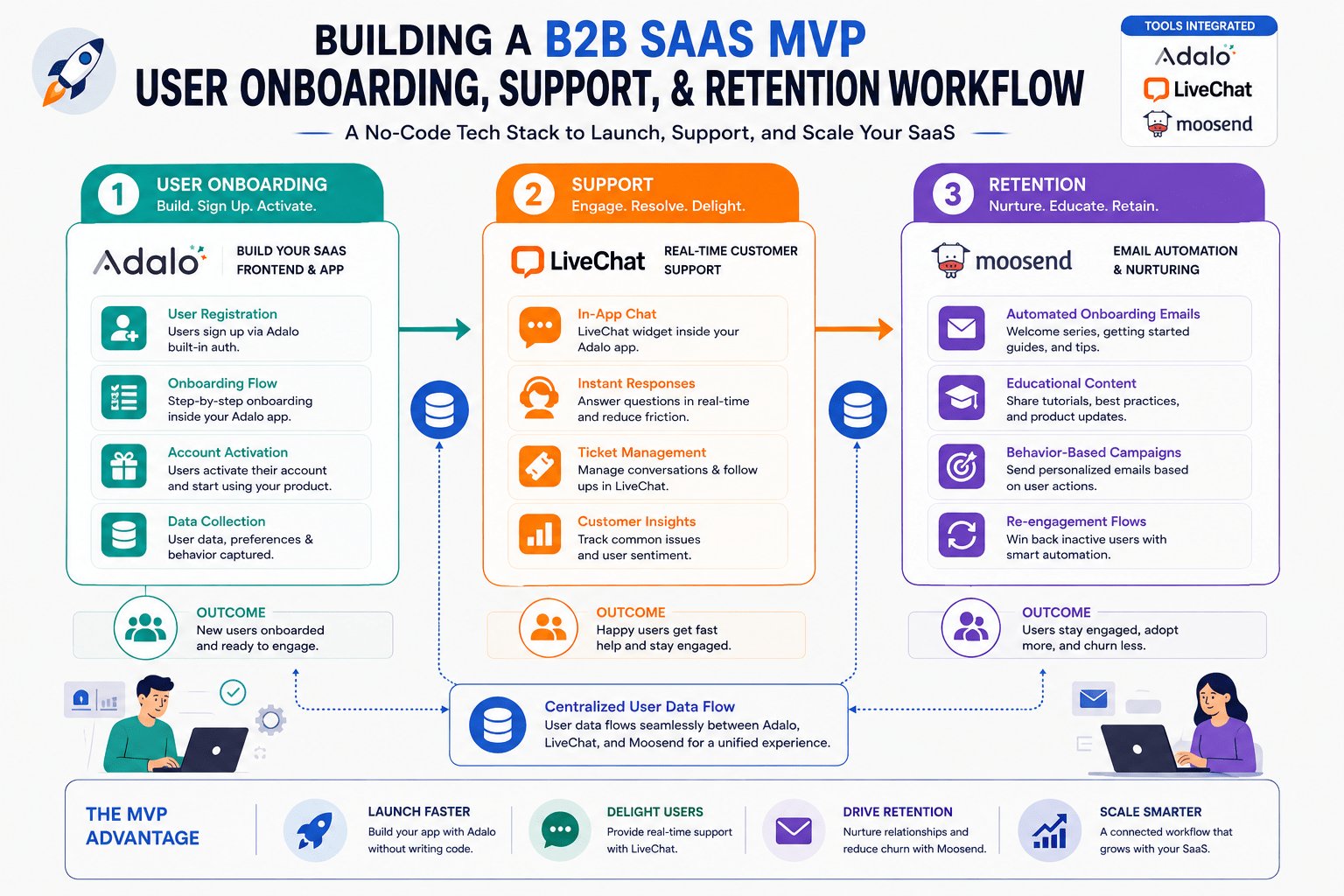
In this comprehensive guide, we will outline a software architecture blueprint to launch your B2B SaaS product in record time without hiring a massive engineering team. We will use Adalo to build the core application, LiveChat for crucial in-app user support, and Moosend to orchestrate the automated email onboarding journey.
The B2B SaaS Startup Tech Stack
When bootstrapping a SaaS, you must protect your capital and your time. Utilizing low-code platforms and specialized SaaS tools allows you to validate your idea rapidly.
1. Adalo: The Core Product Builder
Forget spending $50,000 on a development agency to build your V1. Adalo allows non-technical founders to build complex, data-driven web and mobile applications visually. You can create user dashboards, data input forms, payment gateways (via Stripe integration), and complex relational databases—all the core functionalities required for a B2B SaaS MVP.
Start building your SaaS product today with Adalo.
2. LiveChat: The Customer Success Lifeline
Early-stage SaaS products often have UX quirks. When a CEO or Operations Manager tests your software, they will have questions. If they have to submit an email ticket and wait 24 hours, they will abandon the trial. LiveChat embeds directly into your app, allowing you to hand-hold your first cohort of users, gather immediate product feedback, and fix friction points in real-time.
Embed real-time support into your SaaS with LiveChat.
3. Moosend: The Onboarding and Retention Engine
User retention relies heavily on activation—getting the user to experience the “Aha!” moment of your software as quickly as possible. Moosend allows you to build sophisticated behavior-based email sequences. If a user signs up but doesn’t complete the core setup task, Moosend automatically nudges them.
Automate your SaaS onboarding sequences with Moosend.
Phase 1: Developing the SaaS MVP (Adalo)
We begin by constructing the actual software your clients will pay for.
Step 1: Database Design
- In your Adalo workspace, begin by structuring your database. For a B2B SaaS, your collections might include “Users”, “Companies” (allowing multiple users to belong to one company account), and your core functionality collections (e.g., “Projects”, “Invoices”, or “Tasks”).
- Set up strict data relationships. Ensure a user can only view data linked to their specific “Company” ID to maintain enterprise-level security.
Step 2: The Core User Flow
- Design the Signup and Onboarding screens. Keep the initial signup to just Name, Email, and Password to reduce friction.
- Build the main dashboard. This is where the core value proposition of your SaaS is delivered. Use Adalo’s robust list and chart components to display data visually.
- Integrate Stripe through Adalo’s native component to handle subscriptions, trial expirations, and tier gating (e.g., hiding premium features from free-tier users).
Phase 2: Integrating In-App Support (LiveChat)
Your first users are your most valuable asset. Their feedback will shape your product roadmap. We need to make it effortless for them to talk to you.
Step 1: The Seamless Integration
- Register for LiveChat and configure your chat widget to match your SaaS branding perfectly. Remove the LiveChat branding if you are on a premium tier to maintain a white-label enterprise feel.
- Embed the LiveChat JavaScript snippet into the global header of your Adalo web application.
- Configure the chat widget to appear specifically on screens where users traditionally experience friction (e.g., the complex settings page or the data import screen).
Step 2: Gathering Product Feedback
Instruct your founding team to treat every LiveChat interaction not just as a support ticket, but as product research. When a user asks, “How do I export this report?”, that is a signal that your UI needs adjustment. LiveChat’s tagging system allows you to tag transcripts as “UI/UX Issue” or “Feature Request”, giving you a centralized database of roadmap priorities.
Phase 3: Orchestrating the Onboarding Journey (Moosend)
A great SaaS uses email to pull users back into the app until it becomes a daily habit. We will build a 14-day trial conversion sequence.
Step 1: User Synchronization
- Set up a webhook or use an integration platform (like Make/Pabbly) to connect your Adalo user database to Moosend.
- When a user completes the signup form in Adalo, they should instantly be added to your “SaaS Trial Users” list in Moosend.
Step 2: The 14-Day Trial Automation
- Go to Moosend Automations and create a new workflow.
- Day 1 (Immediate): The Welcome. Send a plaintext email from the Founder. “Welcome to [SaaS Name]. I built this to solve [pain point]. Here is a 2-minute video on how to get started.”
- Day 3 (The Check-in): “Are you stuck?” Highlight your LiveChat feature. “Did you know you can chat with us directly inside the app? We are here to help.”
- Day 7 (The Value Add): Send a case study showing how another B2B client achieved ROI using a specific feature of your software.
- Day 12 (The Transition): “Your trial expires in 48 hours.” Clearly outline the benefits of the paid tier and provide a direct link to the billing page in your Adalo app.
- Day 14 (Decision): Trigger an internal notification if they converted, or send an automated exit survey if they churned.
Best Practices for SaaS Founders
Executing this software architecture with Adalo, LiveChat, and Moosend allows you to operate like a heavily funded startup on a bootstrap budget.
Focus on the “Aha!” Moment
Your onboarding emails and in-app chat should aggressively guide the user toward the one action that proves your software’s value. If you built an invoicing SaaS in Adalo, the “Aha!” moment is sending their first invoice. Every email from Moosend and every proactive chat ping should be focused on getting them to complete that single action.
Iterate Relentlessly
Because you built your app in a low-code environment, you can push updates daily. Combine the qualitative feedback you receive in LiveChat with the quantitative open-rate data from your Moosend campaigns to inform your Adalo product updates. This rapid iteration cycle is how small B2B startups outmaneuver large, slow enterprise competitors.
Conclusion
Launching a B2B SaaS does not require years of development and millions in venture capital. By strategically stacking the right technologies, you can build a complete product ecosystem. Adalo provides the scalable product infrastructure, LiveChat ensures your early adopters receive white-glove onboarding and support, and Moosend automates the crucial retention loops. Assemble this architecture, launch your MVP, and start capturing market share today.
Frequently Asked Questions (FAQ) About Building a B2B SaaS MVP
Will a low-code platform like Adalo scale as my B2B SaaS grows?
This is the most common question among startup founders. The answer is yes, up to a very high volume. Adalo handles the heavy lifting of UI, user authentication, and basic database relations exceptionally well. As your B2B SaaS grows and requires processing millions of rows of data, you can keep the frontend UI in Adalo while migrating the backend database to a dedicated external architecture like Xano or Supabase. This gives you the speed of visual development on the front end and the massive scalability of a dedicated backend, ensuring you never outgrow your initial MVP architecture.
How do I handle global support if I am a solo founder using LiveChat?
Providing 24/7 support as a solo founder or small team is impossible, but LiveChat provides tools to manage expectations. You can configure specific operating hours within the platform. When a B2B client attempts to chat outside those hours, the widget automatically transforms into an asynchronous ticketing form. Furthermore, you can deploy a knowledge base integration or a simple chatbot within LiveChat that answers the 10 most common setup questions automatically, saving you hours of repetitive typing and keeping your users unblocked while you sleep.
Can Moosend track if a user actually performs an action in the app?
Yes, and this is where true SaaS automation thrives. Rather than sending a generic “Day 3” email regardless of what the user has done, you can utilize Moosend‘s website tracking and API capabilities. If a user completes the core setup task in your Adalo app, you can pass a custom event to Moosend. Your automation workflow can feature a conditional split: IF user has completed setup, send advanced tips. IF user has NOT completed setup, send a troubleshooting guide. This behavioral email marketing dramatically increases conversion rates from free trial to paid.
What happens if I want to offer an affiliate program for my B2B SaaS?
Affiliate marketing is a massive growth lever for B2B tools. Because you are controlling the architecture, integrating an affiliate tracking tool is straightforward. When a user clicks an affiliate link, you capture that unique parameter on your Adalo signup page. You then store that affiliate ID in the user’s database record. When they upgrade to a paid tier via Stripe, your backend can automatically trigger a payout or notification. You can use Moosend to email your top affiliates their monthly performance metrics, completely automating your partner growth program.