

Skip the reading. Deploy this exact architecture and consolidate your B2B tech stack today.
Maximizing Business Efficiency: Converting Google Sheets and Excel Data into Powerful Native Apps
In businesses large and small, across virtually every industry, the spreadsheet reigns supreme. Google Sheets and Microsoft Excel are the undisputed workhorses of modern enterprise, used for everything from tracking inventory and managing customer relationships (CRM) to planning complex projects and analyzing financial data. They are flexible, ubiquitous, and deeply ingrained in corporate culture. However, as organizations grow, the limitations of operating purely out of spreadsheets become painfully apparent. Today, we are exploring how to bridge the gap between static data and dynamic action by turning your spreadsheets into powerful native apps using Adalo.
The Inherent Limitations of the Spreadsheet
While spreadsheets are excellent for data storage and calculation, they are terrible user interfaces (UIs) for daily operational tasks. As a spreadsheet grows, it becomes cumbersome. Having multiple team members simultaneously editing rows often leads to accidental data deletion, formatting errors, and broken formulas. Furthermore, spreadsheets are not inherently mobile-friendly; trying to update a complex Excel file on a smartphone while out in the field is a frustrating, error-prone experience.
Perhaps the most significant limitation is the lack of access control and workflow enforcement. In a spreadsheet, a user typically has access to everything or nothing. You cannot easily restrict a field worker to only seeing tasks assigned to them, nor can you easily build logic that triggers an email when a specific status changes. Businesses need systems that guide users through a defined process, and spreadsheets simply cannot do that natively.
The No-Code Solution: Adalo to the Rescue
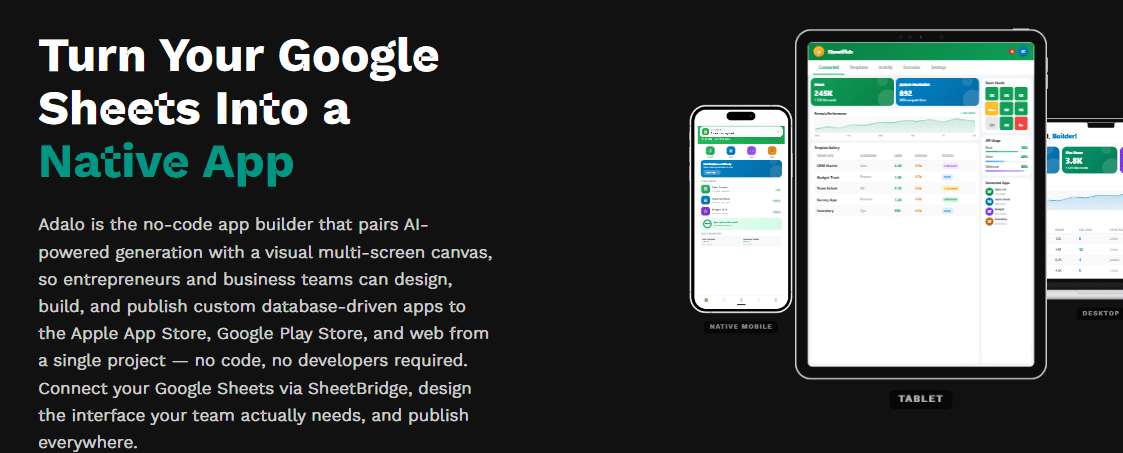
This is where the magic of no-code platforms comes into play. Adalo allows you to take the robust data you already have sitting in Google Sheets or Excel and wrap a beautiful, functional, and intuitive user interface around it. Instead of forcing your employees to navigate endless rows and columns, you can provide them with a custom mobile or web application tailored precisely to their roles.
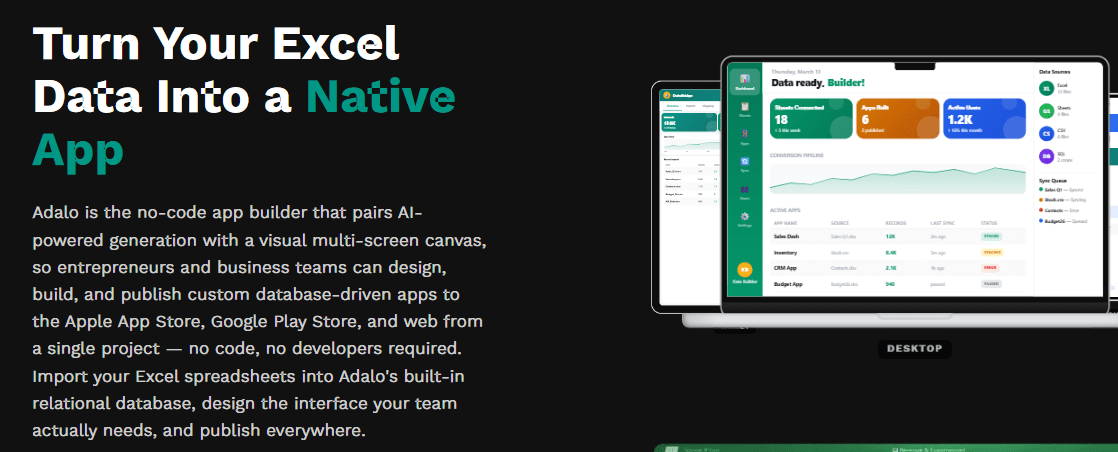
By using Adalo, your spreadsheet transitions from a static digital ledger into the dynamic database backend of a live software application. The data remains where it is, easily accessible for high-level reporting and analysis, but the day-to-day interactions happen through a streamlined, secure app environment.
The No-Code Revolution in the Business Operations Industry
For decades, software development was a walled garden. If you wanted to build an application, you needed to hire a team of developers, spend tens or hundreds of thousands of dollars, and wait months for a minimum viable product (MVP). This traditional model created an immense barrier to entry, stifling innovation and keeping brilliant ideas locked away in the minds of founders and business owners who lacked the technical skills or financial resources to bring them to life.
Today, the landscape has fundamentally shifted. The rise of no-code platforms like Adalo has democratized the creation of digital products. But what exactly does “no-code” mean in the context of Business Operations? It means that the visual interfaces, logic flows, and database structures that once required lines of complex code (like Swift, Kotlin, or React Native) can now be built using intuitive, drag-and-drop mechanics. You act as the architect, while the platform automatically translates your visual design into production-ready code.
This is particularly transformative for Business Operations. Businesses in this sector are constantly under pressure to adapt to changing consumer expectations, streamline operations, and deliver seamless digital experiences. When a company can bypass the traditional development bottleneck, they can rapidly prototype, test, iterate, and deploy solutions at a fraction of the cost and time. Whether it’s an internal tool to manage operations or a consumer-facing application designed to drive engagement, no-code empowers domain experts—the people who actually understand the business problems—to become the builders of the solutions.
The implications are profound. We are moving from an era where technology dictates business strategy to one where business strategy seamlessly dictates technology. By leveraging Adalo, companies in the Business Operations space can maintain a competitive edge, iterate based on real user feedback in real-time, and focus their capital on marketing and growth rather than exorbitant engineering salaries.
Designing Your Internal App Architecture
The process of converting your spreadsheet data into an Adalo app involves a seamless shift from data storage to data presentation. Here is how progressive companies are making the transition:
- Structuring the Data: Before building, you must ensure your spreadsheet is organized like a true database. Each tab should represent a single data type (e.g., ‘Customers’, ‘Orders’, ‘Inventory’), row one must contain clear column headers (keys), and each subsequent row represents a single record.
- Connecting the API: For Google Sheets, Adalo offers direct integrations or straightforward connections via intermediary API services. You point Adalo to your specific spreadsheet and authenticate your account. Adalo immediately reads the structure, recognizing your columns as distinct data properties.
- Building the Interfaces: With the data connected, you move to Adalo’s visual builder. If you are building an inventory management app, you might design a screen featuring a searchable list of products. You drag a ‘List’ component onto the canvas and link it to your ‘Inventory’ sheet. You then assign the ‘Product Name’ column to the title text, the ‘SKU’ to the subtitle, and so on.
- Adding Interactivity (CRUD Operations): An app is only useful if it allows users to interact with the data. Adalo makes it simple to implement Create, Read, Update, and Delete (CRUD) operations. You can build forms that, when submitted, instantly add a new row to your Google Sheet. You can create edit screens where field workers can update the ‘Status’ column of a task directly from their phones.
- Implementing Logic and Security: You can add user authentication, ensuring employees only log in to see their specific data. You can implement visibility rules (e.g., only show the ‘Approve’ button if the logged-in user is a Manager) and trigger actions, vastly improving operational compliance over a shared spreadsheet.
True Cross-Platform Capabilities: Web, iOS, and Android

In today’s multi-device world, users expect to interact with your brand seamlessly across their smartphones, tablets, and desktop computers. Developing separate applications for each of these platforms using native languages (Swift for iOS, Kotlin for Android, HTML/JS for Web) essentially means building and maintaining three different software products. This triples your costs, triples your development time, and creates massive headaches when trying to keep feature parity across platforms.
This is where Adalo truly shines. It operates on a “build once, deploy everywhere” philosophy. When you design your application’s user interface and define its underlying logic within the Adalo canvas, you are creating a unified foundation. From this single source of truth, Adalo can generate a Progressive Web App (PWA) that runs perfectly in any web browser, alongside fully native applications tailored for iOS and Android devices.

For Android users, this means an app that respects Google’s Material Design principles and integrates smoothly with the Android operating system.

For iOS users, it means a crisp, fluid experience that feels right at home on an iPhone or iPad. And for web users, it means immediate access without the friction of an app store download.

This cross-platform approach not only dramatically reduces your initial time-to-market but also simplifies long-term maintenance. When you want to introduce a new feature, tweak your design, or update your database structure, you make the change once in Adalo. That update is then propagated across all your platforms simultaneously, ensuring a consistent and unified user experience. This level of efficiency is what allows lean startups and agile teams to compete with enterprise-level corporations.
Navigating the App Store Publishing Process

Building your app is only the first half of the journey; getting it into the hands of your users is the crucial second step. Historically, publishing an app to the Apple App Store or Google Play Store was a labyrinthine process filled with technical hurdles, strict compliance checks, and confusing certification requirements. One of the most significant advantages of using Adalo is how it streamlines this notoriously difficult phase.
When you build a native application, you aren’t just creating a mobile-responsive website. You are generating a standalone software package—an APK or AAB for Android, and an IPA for iOS. Adalo automatically compiles these packages for you. You don’t need to open Android Studio or Xcode, deal with complicated provisioning profiles, or manually manage SDK versions. The platform handles the heavy lifting of code compilation in the cloud.
Furthermore, navigating the review guidelines of Apple and Google requires precision. Adalo provides comprehensive documentation, automated checks, and a streamlined interface to ensure your application meets the necessary technical criteria before submission. This includes managing app icons, splash screens, permission requests (like camera or location access), and push notification certificates.
The ability to update your app post-launch is equally critical. In the traditional development world, pushing an update requires submitting a new build to the app stores and waiting for approval. With Adalo, many structural and content updates can be pushed over-the-air (OTA) directly to your users’ devices, ensuring they always have the latest version of your product without the friction of a forced download. This agility is a game-changer for maintaining user satisfaction and addressing bugs or adding features rapidly.
Conclusion

Your business runs on data, but your team runs on efficient processes. By keeping your operational workflows trapped inside clunky spreadsheets, you are capping your organization’s productivity and scale. The transition from spreadsheets to custom applications used to be a monumental IT project requiring vast resources.
Now, with Adalo, that transformation can be achieved in a matter of days or weeks by the very people who understand the business processes best. By empowering your team with purpose-built native apps connected directly to your existing Google Sheets or Excel databases, you eliminate errors, drastically improve the mobile work experience, and unlock new levels of business efficiency. Stop managing rows and columns, and start managing operations through intuitive software.