
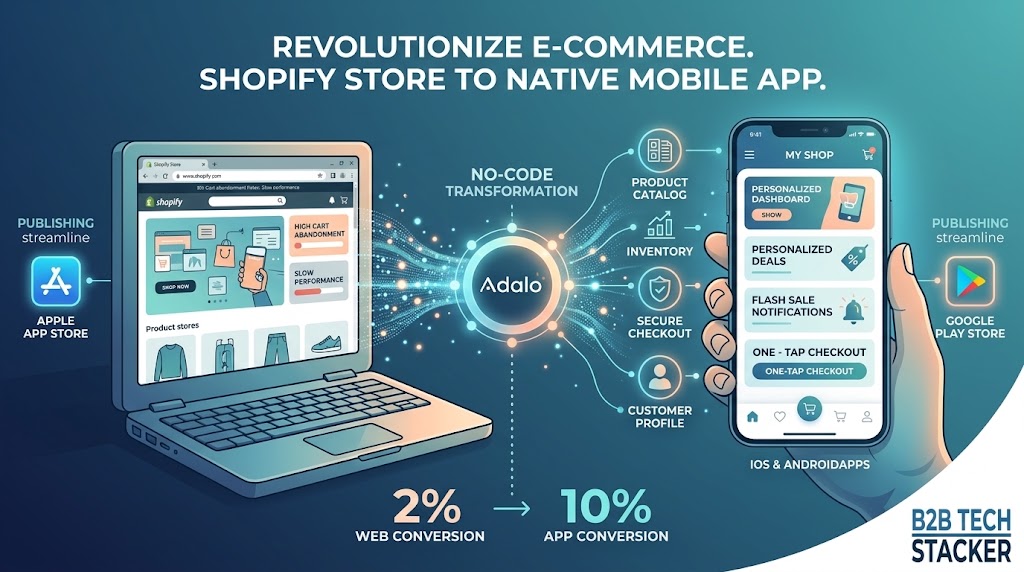
Skip the reading. Deploy this exact architecture and consolidate your B2B tech stack today.
Revolutionizing E-Commerce: How to Transform Your Shopify Store Into a Native Mobile App Without Coding
The e-commerce landscape is undergoing a massive transformation. While having a beautifully designed online store was once enough to guarantee sales, the modern consumer demands more. Mobile commerce (m-commerce) now accounts for a staggering majority of all online retail traffic. If your business relies solely on a mobile browser experience, you are likely leaving substantial revenue on the table. Today, we’re exploring a game-changing strategy: converting your existing Shopify store into a fully functional, native mobile application using Adalo, a leading no-code platform.
The Shift to Mobile-First Retail
Consider your own shopping habits. When you want to browse products, check out a new brand, or make a quick purchase, do you open a web browser on your phone and type in a URL, or do you instinctively reach for a dedicated app? Native applications offer a frictionless experience that mobile websites simply cannot match. They load faster, provide smoother animations, cache data for offline viewing, and crucially, live on the most valuable real estate in the world: your customer’s smartphone home screen.
For Shopify store owners, the goal has always been to build brand loyalty and increase Customer Lifetime Value (CLV). A native app achieves this by creating a closed, immersive environment free from the distractions of a web browser (like competing tabs or search engine results). Furthermore, apps allow for push notifications—a marketing channel with engagement rates that obliterate traditional email marketing. Imagine sending a rich notification about a flash sale directly to your customers’ lock screens; the conversion potential is immense.
Why Choose Adalo to Supercharge Your Shopify Store?

Historically, building a native app to complement your Shopify store meant hiring an agency, spending upwards of $50,000, and waiting six months. Adalo obliterates this barrier. Adalo is a powerful no-code app builder that allows you to design, build, and publish native apps visually. It doesn’t just create a “wrapper” around your website; it builds a true native app that connects seamlessly to your Shopify backend.
By leveraging Adalo’s robust integration capabilities, you can sync your Shopify product catalog, inventory levels, customer data, and checkout processes directly into your custom app interface. This means you only have to manage your business from one central hub (Shopify), while providing your customers with a premium, app-exclusive experience on the frontend.
The No-Code Revolution in the E-Commerce Industry
For decades, software development was a walled garden. If you wanted to build an application, you needed to hire a team of developers, spend tens or hundreds of thousands of dollars, and wait months for a minimum viable product (MVP). This traditional model created an immense barrier to entry, stifling innovation and keeping brilliant ideas locked away in the minds of founders and business owners who lacked the technical skills or financial resources to bring them to life.
Today, the landscape has fundamentally shifted. The rise of no-code platforms like Adalo has democratized the creation of digital products. But what exactly does “no-code” mean in the context of E-Commerce? It means that the visual interfaces, logic flows, and database structures that once required lines of complex code (like Swift, Kotlin, or React Native) can now be built using intuitive, drag-and-drop mechanics. You act as the architect, while the platform automatically translates your visual design into production-ready code.
This is particularly transformative for E-Commerce. Businesses in this sector are constantly under pressure to adapt to changing consumer expectations, streamline operations, and deliver seamless digital experiences. When a company can bypass the traditional development bottleneck, they can rapidly prototype, test, iterate, and deploy solutions at a fraction of the cost and time. Whether it’s an internal tool to manage operations or a consumer-facing application designed to drive engagement, no-code empowers domain experts—the people who actually understand the business problems—to become the builders of the solutions.
The implications are profound. We are moving from an era where technology dictates business strategy to one where business strategy seamlessly dictates technology. By leveraging Adalo, companies in the E-Commerce space can maintain a competitive edge, iterate based on real user feedback in real-time, and focus their capital on marketing and growth rather than exorbitant engineering salaries.
Step-by-Step: Connecting Shopify and Adalo
Creating this integration is remarkably straightforward, even if you’ve never written a line of code in your life. Here is a comprehensive look at the process:
- Setting the Foundation: Begin by creating an account on Adalo and starting a new project. You can choose from pre-built e-commerce templates or design your app completely from scratch to match your brand’s unique aesthetic.
- Establishing the Connection: Adalo utilizes API integrations to communicate with external databases. You will use the Shopify Storefront API. Within Adalo, you navigate to the external collections area and input your Shopify API credentials. This establishes a secure, real-time pipeline between your app and your store.
- Mapping the Data: Once connected, you map your Shopify data endpoints to your Adalo UI components. For instance, you link your Shopify ‘Products’ endpoint to a custom list in Adalo. You tell the platform to display the product image, title, price, and description. Because it’s a live connection, any price change or inventory update made in Shopify instantly reflects in the app.
- Designing the Experience: This is where you leverage Adalo’s visual canvas. Design beautiful product detail pages, intuitive shopping carts, and personalized user profiles. You have complete control over colors, typography, spacing, and user flow, ensuring the app feels like a premium extension of your brand.
- Implementing the Checkout: Adalo allows you to handle the checkout process securely. You can pass the user’s cart data back to Shopify’s secure checkout system, ensuring compliance with payment processing standards and maintaining the tax and shipping rules you’ve already established.
Navigating the App Store Publishing Process

Building your app is only the first half of the journey; getting it into the hands of your users is the crucial second step. Historically, publishing an app to the Apple App Store or Google Play Store was a labyrinthine process filled with technical hurdles, strict compliance checks, and confusing certification requirements. One of the most significant advantages of using Adalo is how it streamlines this notoriously difficult phase.
When you build a native application, you aren’t just creating a mobile-responsive website. You are generating a standalone software package—an APK or AAB for Android, and an IPA for iOS. Adalo automatically compiles these packages for you. You don’t need to open Android Studio or Xcode, deal with complicated provisioning profiles, or manually manage SDK versions. The platform handles the heavy lifting of code compilation in the cloud.
Furthermore, navigating the review guidelines of Apple and Google requires precision. Adalo provides comprehensive documentation, automated checks, and a streamlined interface to ensure your application meets the necessary technical criteria before submission. This includes managing app icons, splash screens, permission requests (like camera or location access), and push notification certificates.
The ability to update your app post-launch is equally critical. In the traditional development world, pushing an update requires submitting a new build to the app stores and waiting for approval. With Adalo, many structural and content updates can be pushed over-the-air (OTA) directly to your users’ devices, ensuring they always have the latest version of your product without the friction of a forced download. This agility is a game-changer for maintaining user satisfaction and addressing bugs or adding features rapidly.
True Cross-Platform Capabilities: Web, iOS, and Android

In today’s multi-device world, users expect to interact with your brand seamlessly across their smartphones, tablets, and desktop computers. Developing separate applications for each of these platforms using native languages (Swift for iOS, Kotlin for Android, HTML/JS for Web) essentially means building and maintaining three different software products. This triples your costs, triples your development time, and creates massive headaches when trying to keep feature parity across platforms.
This is where Adalo truly shines. It operates on a “build once, deploy everywhere” philosophy. When you design your application’s user interface and define its underlying logic within the Adalo canvas, you are creating a unified foundation. From this single source of truth, Adalo can generate a Progressive Web App (PWA) that runs perfectly in any web browser, alongside fully native applications tailored for iOS and Android devices.

For Android users, this means an app that respects Google’s Material Design principles and integrates smoothly with the Android operating system.

For iOS users, it means a crisp, fluid experience that feels right at home on an iPhone or iPad. And for web users, it means immediate access without the friction of an app store download.

This cross-platform approach not only dramatically reduces your initial time-to-market but also simplifies long-term maintenance. When you want to introduce a new feature, tweak your design, or update your database structure, you make the change once in Adalo. That update is then propagated across all your platforms simultaneously, ensuring a consistent and unified user experience. This level of efficiency is what allows lean startups and agile teams to compete with enterprise-level corporations.
Conclusion and Next Steps

The barrier to entry for mobile commerce has never been lower, yet the potential rewards have never been higher. Transforming your Shopify store into a native mobile app is no longer a luxury reserved for massive retail conglomerates; it is a vital strategy for any serious e-commerce brand looking to scale, foster loyalty, and increase conversions.
By embracing no-code technology, you can bypass the traditional headaches of software development. Adalo provides the tools, the integrations, and the infrastructure to turn your vision into a reality. The time to optimize your mobile strategy is now. Start building your custom e-commerce application today and unlock a new channel of explosive growth for your retail business.
